
The dashboard
A few weeks after you set up your pipelines, it's hard to remember what you installed, when each one runs, whether it still works and what it's costing you. pipelines web answers all four: a local, read-only dashboard at http://127.0.0.1:7717 over every pipeline in the data repo and every run on disk.
Open it
Run it from inside the data repo, then open the address in your browser:
cd ~/pipelines-starter# your data repopipelines web# http://127.0.0.1:7717pipelines web -p 8080# if 7717 is takenIt runs in the foreground until you stop it with Ctrl-C. Stopping it changes nothing: your pipelines keep running on their schedule whether or not the dashboard is open. It never writes anything either; it only reads the pipelines, the runs in .runs/ and the state of launchd or systemd.
It doesn't ask the internet for anything: its fonts are served from the engine itself, so it works offline. It follows your system's light or dark mode. Every page has the same header, with Overview and Costs, and the same footer: the address with read-only, the data repo it is reading (with ~ for your home folder) and the scheduler it asks, launchd or systemd.
Read the overview
The first page is the answer to "is everything all right?".
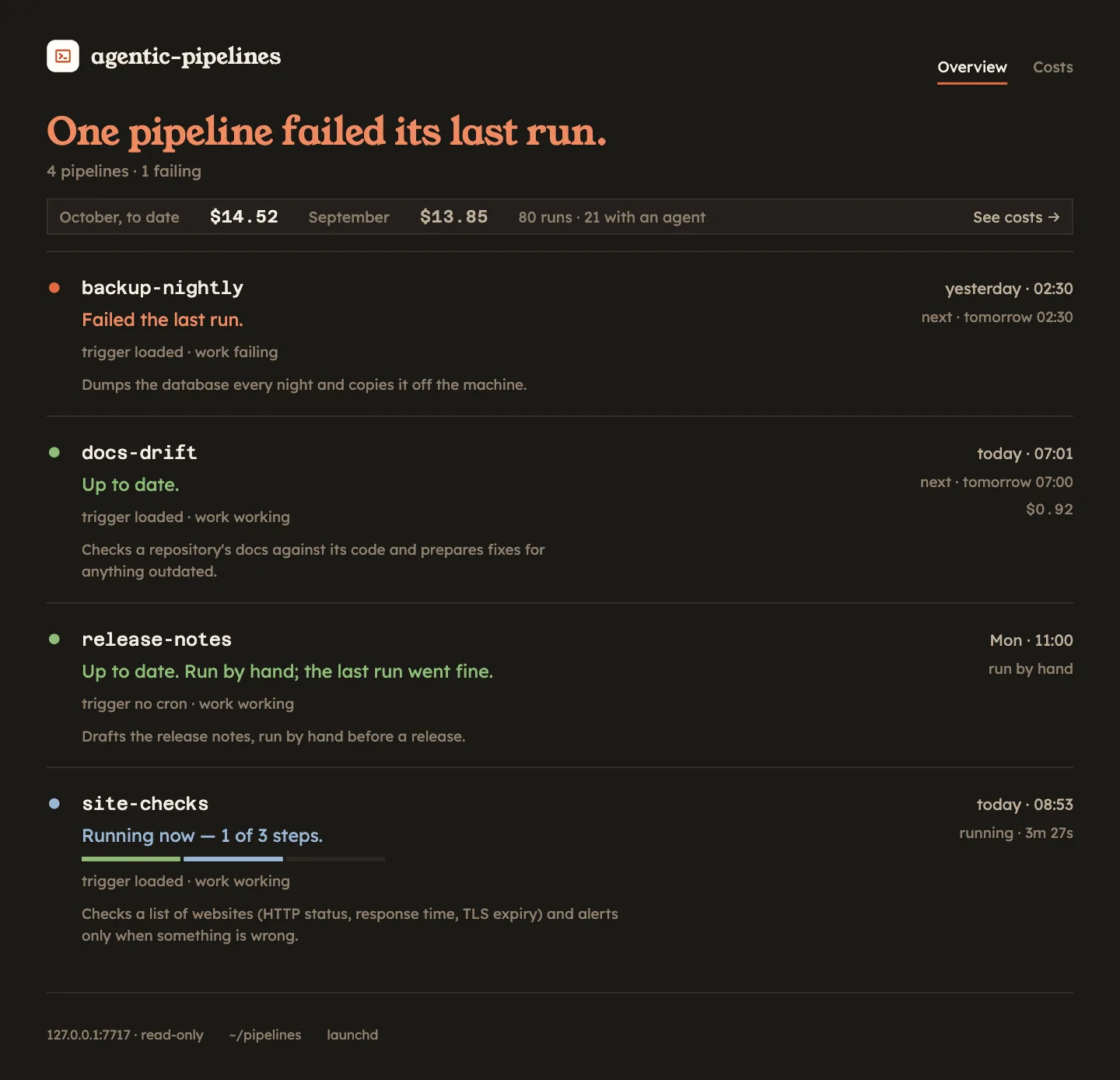
At the top, one line sums up the whole repo. It names the worst thing going on: "One pipeline is loaded and produces nothing.", then "One pipeline is not triggered by anything.", "One pipeline has gone nights without working." and "One pipeline failed its last run.", down to "All in order.". The line under it counts every problem present, so a second one is never hidden behind the first: "7 pipelines · 1 not triggered · 2 failing".
Under the headline, a strip with what you have spent: this month so far, last month, how many runs this month and how many of them used an agent ("80 runs · 21 with an agent"), and See costs →, which opens the costs page.
Below it, one row per pipeline:
- A dot and a verdict. Green is fine, red needs you, amber is worth a look, blue is running right now. The verdict says why in one sentence: "Up to date.", "Failed the last run.", "Not installed in launchd. Nothing triggers it.".
- Two axes. Each pipeline is judged twice, because a job can fail in two different ways: nothing starts it, or it starts and doesn't work.
- Its description, from its
pipeline.yaml. - On the right, when the last run started (today, yesterday, the day of the week, or the date), when the next one is due and what the last one cost. Runs with only
shellsteps cost nothing and show no amount.
The next run reads "next · tomorrow 08:00", or "next · Mon 07:00" further ahead; hover it for the full date. It is worked out from the pipeline's cron, the same way the scheduler reads it. Two other values mean something:
| Next run | Meaning |
|---|---|
| no next run (in red) | The pipeline has a cron, but its job isn't installed or is disabled. Nothing will start it. |
| run by hand | The pipeline has no triggers:. You run it with pipelines run <name>. |
Trigger: does anything start it?
| Value | Meaning | What to do |
|---|---|---|
| loaded | launchd or systemd has the job and it matches the pipeline. | Nothing. |
| drifted | The job is loaded but was generated from an older version of the pipeline, for example before you changed its cron. | Run pipelines install <name> again. |
| not installed | No scheduled job. Nothing will start it. | pipelines install <name>, or ignore it if you uninstalled it on purpose. |
| disabled | The job exists but is disabled in launchd or systemd. | See Operating day to day. |
| no cron | The pipeline has no triggers:. You run it by hand. | Nothing. |
A pipeline that isn't installed or is disabled turns its row red and the headline counts it, even if its last run went fine: however well that run went, nothing will launch the next one.
Work: does it do its job?
The dashboard watches a window of twice the pipeline's period: two days for a daily pipeline, two weeks for a weekly one. One missed night, like a laptop that was closed, doesn't turn anything red; two in a row do.
| Value | Meaning |
|---|---|
| working | The last run that did any work, inside the window, succeeded. |
| failing | The last run that did any work failed. Open it to see which step and why. |
| stuck | It keeps running, but every run is skipped by a guard or a busy lock, so no work gets done. |
| silent | It used to run and has stopped: no run at all inside the window. |
| never worked | Installed or created, but it hasn't run yet. |
The combination the dashboard exists for is loaded and silent: the scheduler says the job is there, and yet nothing has run. That is the failure no notification can catch, because without a run there is nothing to notify about. Its row turns into a red box across the whole page with the last lines of the scheduler's log for that job, so you can see why nothing comes out, and the headline says so too.
An empty repo
If the data repo has no pipelines yet, the overview says "This repo has no pipelines." and how to start: each pipeline lives in pipelines/<name>/pipeline.yaml, pipelines validate <name> checks it, and it shows up on the next refresh. Or start from the ready-made pipelines of the starter.
See what it costs
Costs, in the header (or See costs → on the overview), opens /costs: what your pipelines have spent, all in local time.
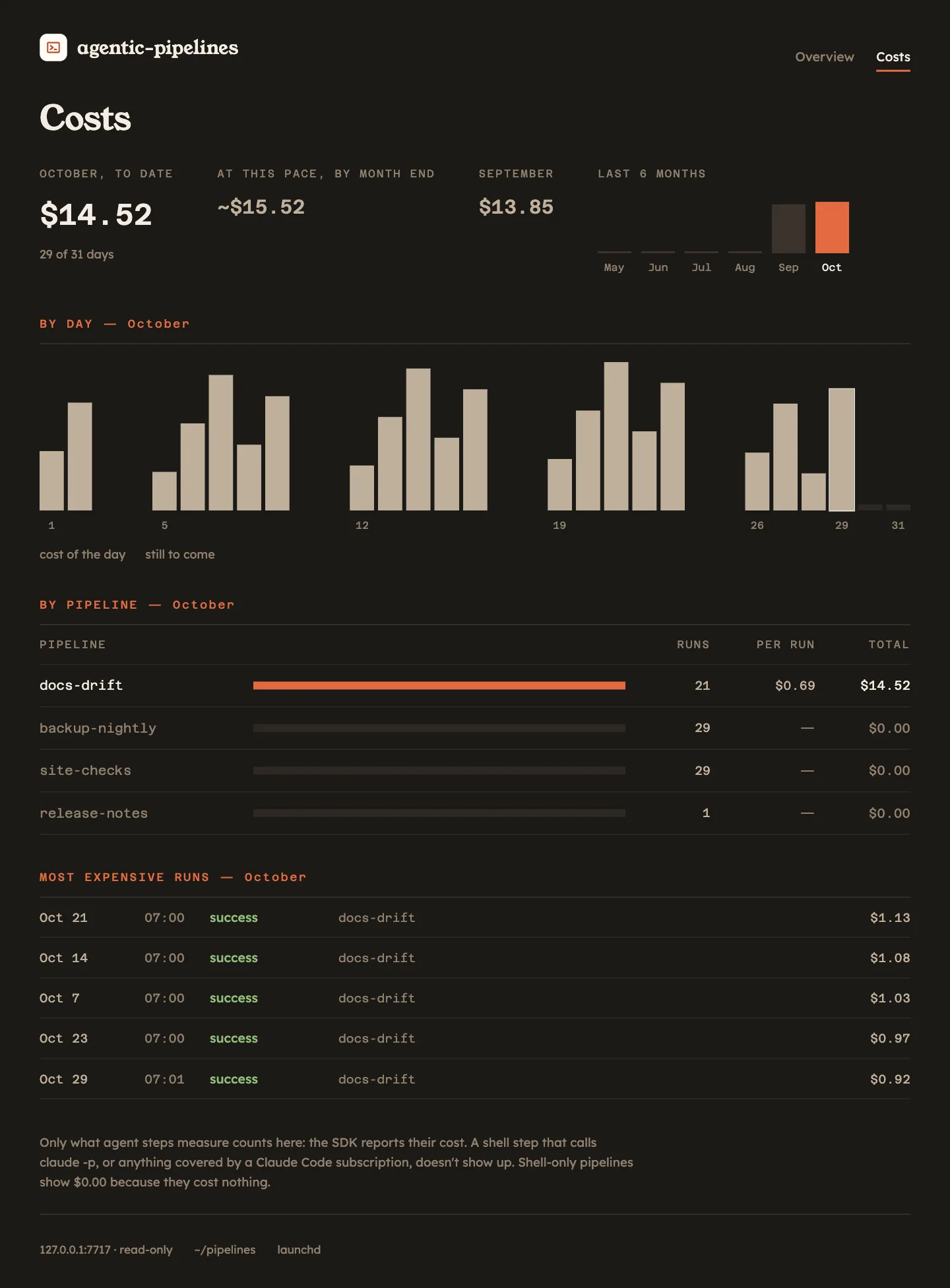
- This month, to date, with how far into the month you are ("29 of 31 days").
- At this pace, by month end: this month's total spread over the whole month, as an estimate ("~$15.52"). It doesn't appear on the 1st, when one day is not a pace yet.
- Last month, and a bar for each of the last 6 months, the current one highlighted.
- By day: a bar per day of this month with what it cost; the days still to come stay empty. If one day of the week carries at least 40 % of the month, a note says which, and which pipeline weighs most on it ("Mondays weigh more: docs-drift").
- By pipeline: for each one, this month's runs, the average cost of a run that cost something, and the total. The most expensive goes first; pipelines that cost nothing are greyed out.
- Most expensive runs: this month's five, each linked to its page.
What it doesn't count
The costs page only counts what agent steps measure: the cost the Agent SDK reports for each of them, saved in the run. Anything else doesn't appear:
- A
shellstep costs nothing here, even if it callsclaude -por another model from a script: the engine can't see what that call spent. - Anything covered by a subscription, such as a Claude Code plan, doesn't appear either.
So the page tells you what your agent steps cost, not your whole bill with the model provider.
Open a pipeline
Click a pipeline's name to see:
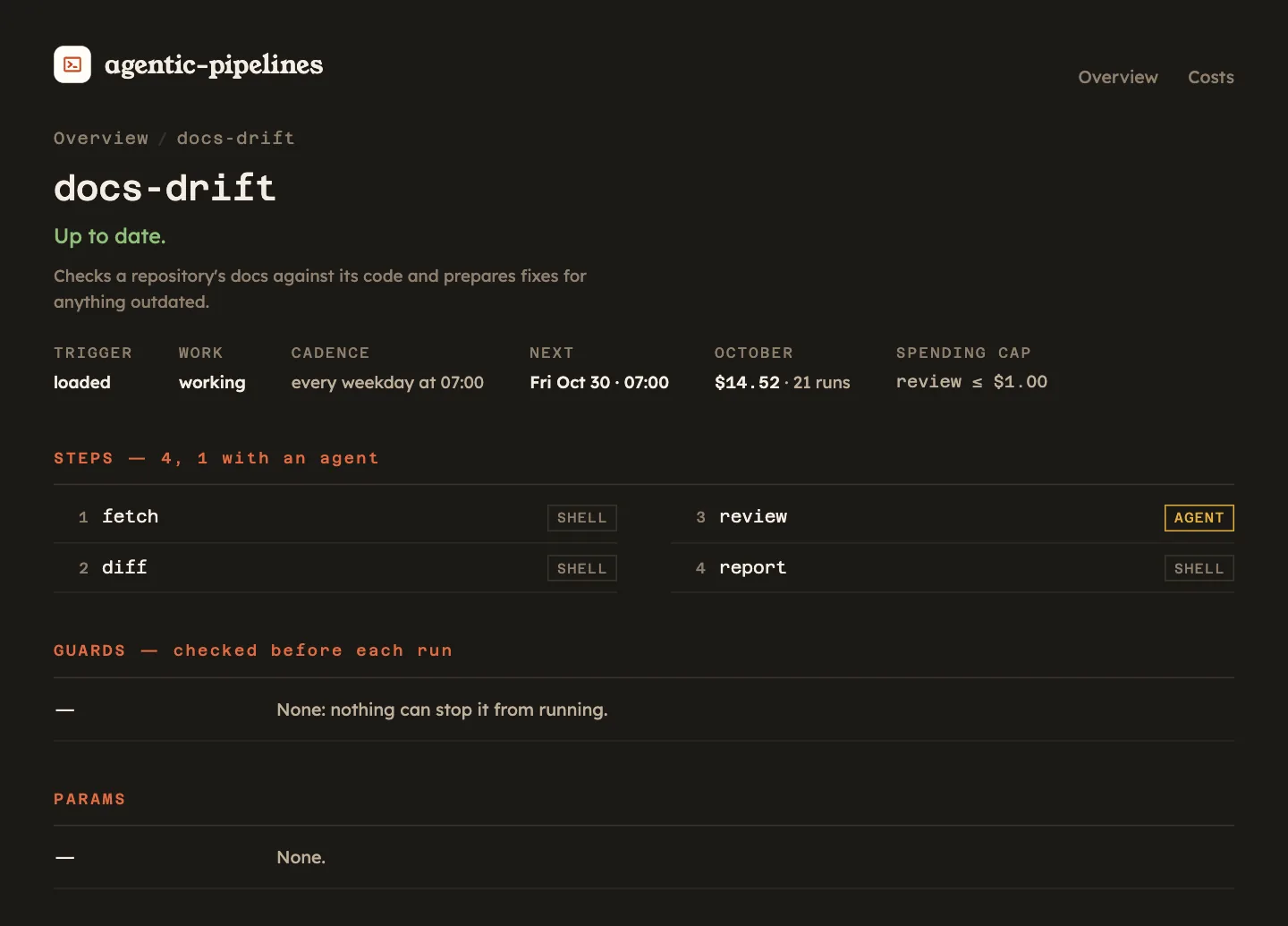
- its trigger, work and schedule, in words: "every day at 08:00", "every weekday at 07:00";
- its next run, with its full date ("Fri Oct 30 · 07:00"), and what it has cost this month, with its number of runs;
- the spending cap of each
agentstep, itsmax_cost_usd("review ≤ $1.00"); - its steps, numbered and in order, each marked
SHELLorAGENT; - its guards, the conditions checked before each run;
- its params and their descriptions;
- every run, newest first, with when it started, its status, why it was skipped if it was, and what it cost.
That run list is the quickest way to see what one pipeline costs you over time; the costs page does the same for all of them.
Open a run
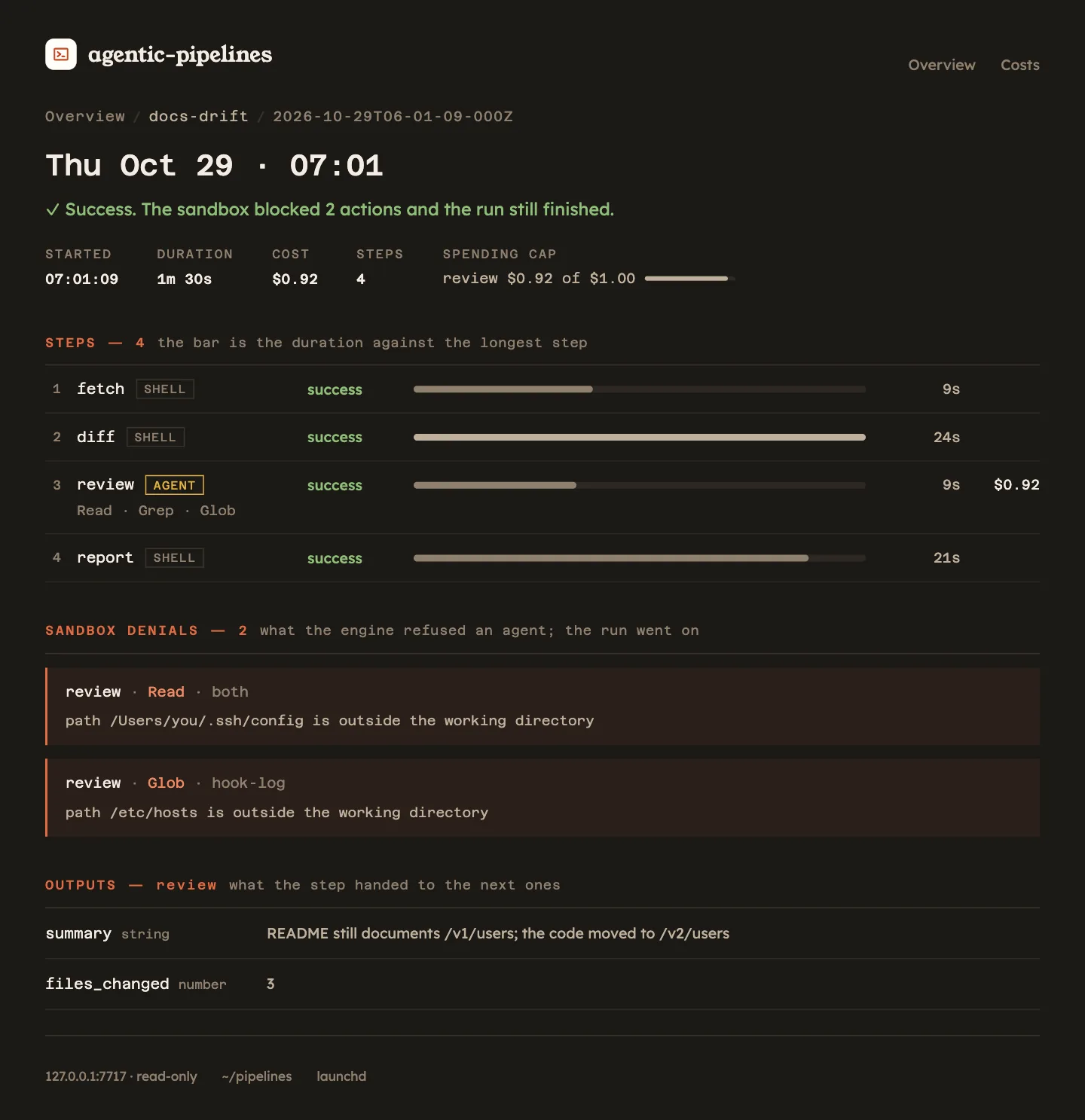
Click a run to see what happened in it. The title is when it started ("Thu Oct 29 · 07:01"), marked "forced — guards skipped" if someone ran it with --force, and under it one sentence with the verdict: "Success.", or "Success. The sandbox blocked 2 actions and the run still finished.". Then:
- STARTED, DURATION, COST, STEPS (with how many were skipped, "4 · 1 skipped") and the SPENDING CAP of each agent step against what it spent ("review $0.92 of $1.00");
- each step, marked
SHELLorAGENT, with how long it took as a bar against the longest one and what each agent step cost; - the tools each agent used, or the error or skip reason of each step;
- the sandbox denials: every action the engine refused an agent, with the step, the tool, the path and the reason. In one of our test runs an agent tried to read a file outside its working folder; the engine blocked it, recorded it, and the run still finished green;
- the outputs of each agent step: what it handed to the next steps, with each key, its type and its value.
Read a step's log
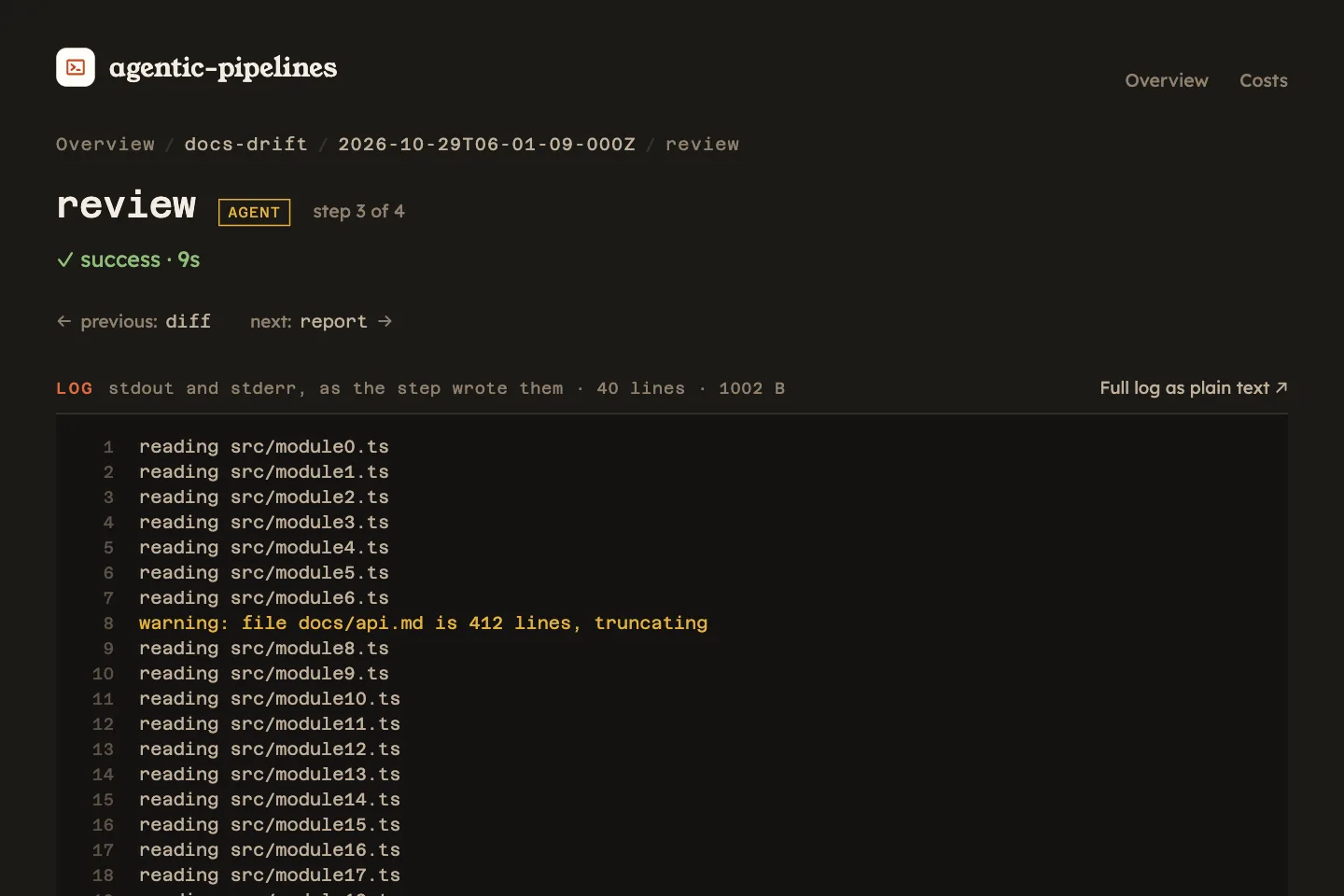
Click a step to read its log. Its page says which step it is ("step 3 of 4"), whether it is SHELL or AGENT, how it ended and how long it took, with ← previous and next → to walk through the run's steps in the order the pipeline declares them.
The lines are numbered. Lines that start with warning or warn are in amber, and lines that start with error or fatal in red, so they stand out in a long log. A long log shows only its tail; Full log as plain text ↗ is always there, and opens the whole file.
Watch a run live
While a pipeline is running, its row turns blue and says "Running now", with how many steps are done ("Running now — 1 of 3 steps."). Under it, a progress bar with one segment per step of the pipeline: the ones already done take the color of how they ended, the one running now is blue and the rest stay empty. On the right, "running · 3m 12s" counts the time since it started.
The overview and the run page update on their own, about once a second, so you can launch a run with pipelines run <name> and watch it from the browser. A step gets its log page as soon as it ends.
On a server
The dashboard listens only on 127.0.0.1, with no flag to change it: exposing it to the network is a different design, with its own conversation about authentication. -p or --port changes the port, not the address.
On a server, reach it from your laptop through an SSH tunnel:
ssh -L 7717:127.0.0.1:7717 <server># from your laptoppipelines web# on the server, inside the data repoThen open http://127.0.0.1:7717 in your laptop's browser. The footer shows systemd as the scheduler.
From the terminal
The same data is on the command line: pipelines status lists the latest runs and pipelines show opens one. See Operating day to day.